
If you're looking for an auto-play helper for MapleStory Classic World, first confirm two things: that you're looking at a product specifically for Classic World, not for MapleStory Artale on the MapleStory Worlds platform; and that the product page's current compatibility and maintenance status matches the client stage you're playing on.
TopCheat's official site lists four core features for Classic World: auto-farming, monster gathering, auto loot pickup, and delay-free attacks. Below, we break down what each of these does in the actual farming loop, how to combine them, and what to check before ordering.
Why Classic World's Needs Are Focused on Auto-Play
Classic World recreates MapleStory before Big Bang: leveling is slow, and 3rd job and high-level content are released in stages. According to Nexon's announced timeline, Founder's Access began on October 6, 2026, and the global PC version officially launched on October 21.
This pacing means that most of the early and mid-game is spent on the same map repeatedly killing monsters, picking up drops, and waiting for respawns. For these players, what's truly useful is a feature that can run the farming loop stably for long periods, not the wallhacks or aimbots common in competitive games. The Classic World product page's feature set is built around exactly this.
What Each of the Four Modules Does in the Farming Loop
A typical farming cycle goes: find monsters → attack → clear a wave → pick up drops → wait for respawn. The four modules correspond to these stages:
- Auto-farming: Handles the main loop, letting the character continuously find and attack monsters on the map without you having to stay at the keyboard. Suitable for long sessions on the same leveling map.
- Monster gathering: Pulls scattered monsters together, reducing time spent moving around to find them. It's more beneficial for AoE skills; if your class can only hit one or two monsters at a time, gathering won't help much since you'll still have to kill them one by one.
- Auto loot pickup: Picks up dropped mesos and items. Over long auto-play sessions, not picking up loot means giving up part of your earnings, so it's usually used together with auto-farming.
- Delay-free attacks: Based on the name, it targets the wait time between attack actions to speed up clearing. For specific behavior and adjustable range, refer to the product page.
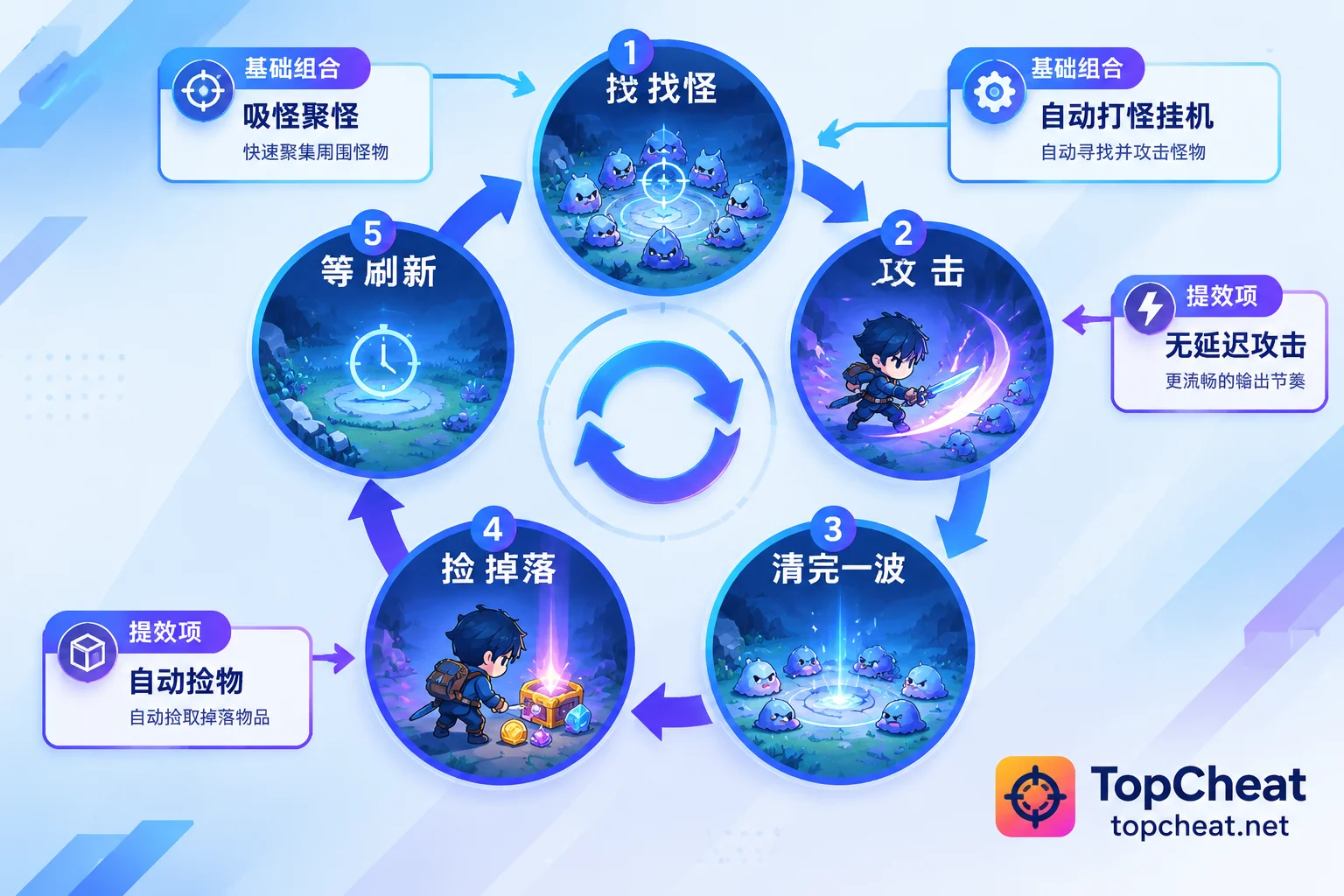
In terms of combination: auto-farming + auto loot pickup is the basic combo, solving the problem of whether you can leave the keyboard and keep farming; monster gathering and delay-free attacks are efficiency boosters, solving how much you can farm per hour. The more aggressively you enable the boosters, the more your character's behavior differs from a normal player, so whether to enable them and to what degree should be considered together with the account risks discussed below.
Also note: features not listed on the Classic World page should not be assumed to exist. For example, auto potion refill, minimap display, and teleport through maps are features listed on the Artale product page, not on the Classic World feature list.
It's Not the Same as the MapleStory Artale Helper
Both games focus on nostalgia, and both helpers offer auto-play, so they're easily confused. But they are different games with different clients, and their products are not interchangeable.
| Comparison | MapleStory Classic World | MapleStory Artale |
|---|---|---|
| Game type | Nexon's official classic server (MapleStory Classic World) | A derivative nostalgic world on the MapleStory Worlds platform |
| Features listed on official site | Auto-farming, monster gathering, auto loot pickup, delay-free attacks | Auto-play script, monster/player minimap, auto supply, teleport through maps |
| Product entry | MapleStory Classic World Helper | MapleStory Artale Helper |
| License key | Purchased separately per game; not interchangeable | Purchased separately per game; not interchangeable |
The way to tell is simple: if you launch the official Nexon Classic World client, look at the Classic World page; if you enter Artale through MapleStory Worlds, look at the Artale page. If you buy the wrong license key, it cannot be used for the other game.
Check These Before Ordering
1. Compatibility status and client stage
From Founder's Access to official launch and then to staged releases like 3rd job, the Classic World client may update. Before buying, check whether the product page indicates available, under maintenance, or in testing, rather than just looking at the feature list. For specific prices and availability, refer to the product page in real time; this article does not list amounts.
2. How to choose a plan
The official site offers daily, weekly, and monthly passes for each game. A safer approach: first use a daily pass to confirm it runs properly on your computer and current client and that the farming loop meets expectations, then consider a weekly or monthly pass based on how long you plan to auto-play. This step is especially worth doing right after a game launches or updates.
3. Device binding and unbinding
Activation scope, device binding, and unbinding conditions vary by game. If you switch between multiple computers, check the binding rules on the Classic World page before ordering, and confirm any questions through the official customer service entry.
4. Account risk must be factored in
Nexon has issued announcements about account penalties for Global MapleStory and Global MapleStory Classic World, indicating that violation handling is linked. In other words, a penalty on Classic World may affect more than just your Classic World characters. If you have a heavily invested account on the main server and share the same Nexon account with Classic World, this is a point to weigh carefully before choosing. No helper can guarantee immunity from penalties, and claims like "permanently ban-free" should not be taken as a basis.
Next Steps
Once you've confirmed you're playing the official Classic World, and you understand what each of the four modules does, you can visit the TopCheat MapleStory Classic World Helper page to view the current feature descriptions, compatibility status, and pricing for each plan.




Comments(0)