
In ARC Raiders, the assisted extraction point feature can help you answer two questions: where to extract from, and whether that exit is safe to approach right now. TopCheat's official website lists an "Extraction Point Marker" for the game to indicate exit locations; it also offers player/mech ESP, which can be used to check whether there are ambushing players or ARC mech patrols around the exit. The former is for route planning, the latter for risk assessment, and they are generally used together.
One thing to clarify first: the official website does not currently disclose the specific display method of the extraction point marker, such as whether it shows a remaining countdown or whether it distinguishes Raider Hatches based on whether the player holds a key. These details should be based on the actual software's parameter panel; this article makes no speculation.
First, understand the types of extraction points in the game
Markers only tell you where the exits are. Whether they can be used and what the cost is depends on the extraction point type. According to publicly available guide information, ARC Raiders extraction points fall into four main categories:
| Type | Activation Condition | Points to Note |
|---|---|---|
| Cargo Elevators | Directly interactable | Some sites have an independent countdown and close permanently when it reaches zero |
| Metro Stations | Directly interactable | Same as above; confirm whether it is still open in the current match |
| Air Shafts | Directly interactable | Same as above |
| Raider Hatches | Requires holding a Raider Hatch Key | Without the key, even if marked, it cannot be used |
So after seeing a marker, do not assume every point can be used for extraction. Some ordinary extraction points have their own countdowns and will close when time runs out; Raider Hatches require checking your backpack for a key first. The open/close times of each extraction point on each map may change with versions, so refer to the in-game display.
Why extraction is the stage where gear is most easily lost in a match
After activating the extraction terminal or beacon, you usually have to wait about 60 to 90 seconds of call-in time. During this period, a large-area audio-visual signal appears, such as an alarm or a flare, effectively broadcasting your position to everyone nearby.
There are two common types of threats during the wait:
- ARC mechs: attracted by the signal, wandering over from the surrounding area;
- Other players: some will camp near the exit in advance, waiting for others to start extraction before striking and taking the loot from their entire match.
Many people lose a full pack of supplies in the final minute. The usefulness of the extraction point feature is mainly reflected around this period.
How extraction point markers and ESP divide roles during extraction
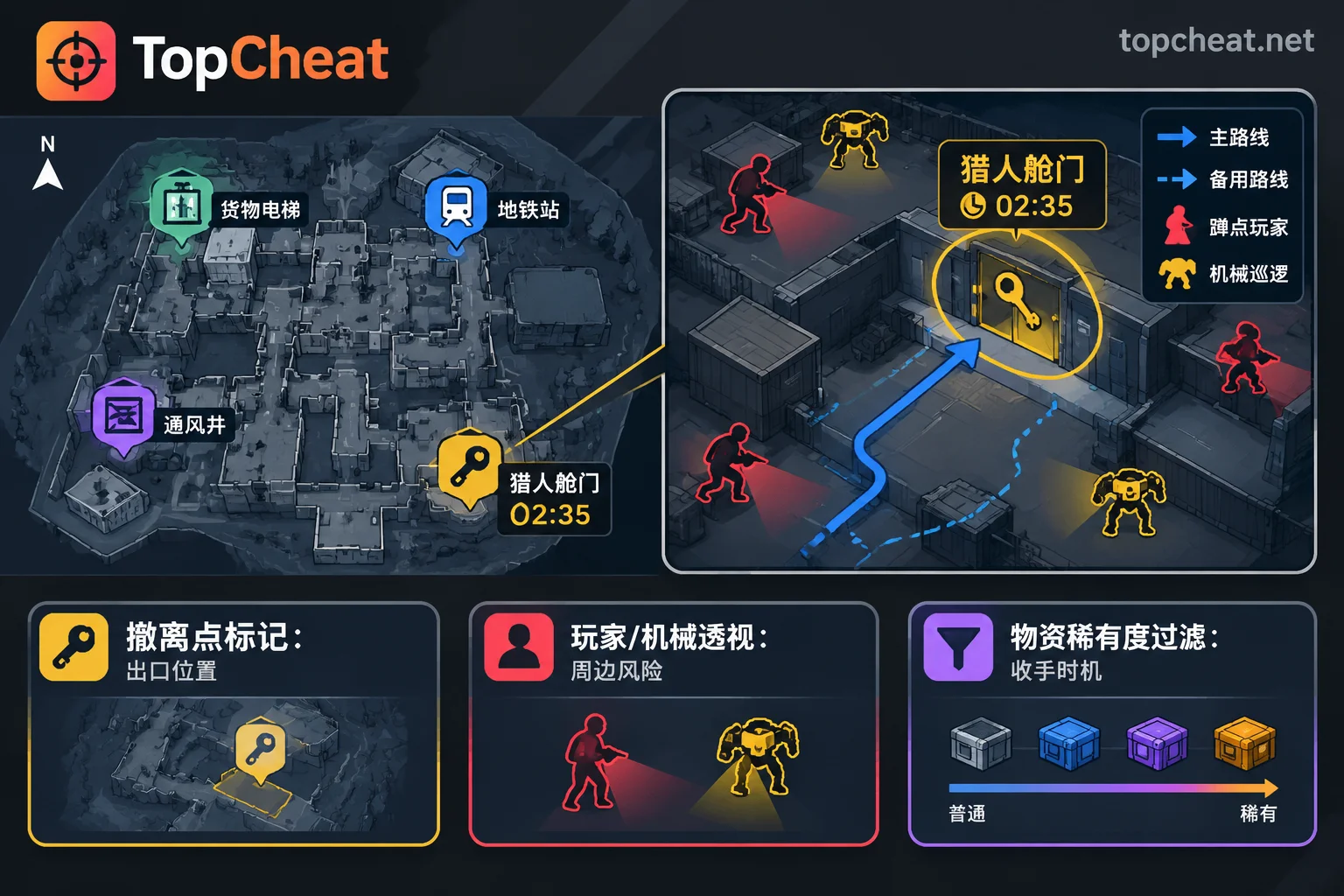
According to the ARC Raiders features publicly listed on TopCheat's official website, extraction-related information is roughly divided as follows:
- Extraction Point Marker: indicates exit locations on the map, reducing time spent searching for exits and taking detours, and makes it easier to set a primary route and backup route in advance.
- Player ESP: before approaching an exit, check whether there are players lingering nearby. People who stay by an exit for a long time are very likely to be camping.
- Mech ESP: check ARC mech patrols around the exit to judge whether you might be surrounded by mechs after starting the call-in.
- Loot Rarity Filter: related to extraction timing. When the high-rarity loot in your backpack is already sufficient, you can stop looting and head straight for the exit.
- Aimbot: if you still run into combat during the extraction wait, it is a module for handling firefights and cannot replace the route and risk assessment described above.
It is important to distinguish clearly here: markers and ESP provide location information. Whether the extraction point is currently open and how much countdown remains still depends on in-game prompts.
A reference extraction workflow
The following order is suitable for situations where you want to bring loot out safely:
- Check markers at the start: confirm the exit distribution on this map, choose a primary extraction point, then choose a backup point in a different direction.
- Verify activation conditions: if the primary extraction point has a countdown, factor its closing time into your looting time; if you choose a Raider Hatch, first confirm you have a key.
- Use loot filtering to decide when to stop: once you have enough high-value loot, turn toward the exit; do not wait until the countdown is almost over to start moving.
- Stop and observe before reaching the exit: keep some distance and use player/mech ESP to check the surroundings. If someone is camping or there are too many mechs, switch to the backup point.
- Start only after confirming safety: during the call-in, watch ESP for players or mechs approaching you, and find cover positions in advance.
- Relocate directly if something changes: if the backup exit is still within its open time, it is easier to preserve your loot by moving than by staying in place.
The core is observe first, then start. Once the signal is sent, your position is exposed. The more information you have before starting, the more choices you have.
Points to verify before purchasing
TopCheat offers daily, weekly, and monthly cards plus customer service entry points for each game separately. For the ARC Raiders product, the card key scope, device binding and unbinding conditions, supported versions, and current maintenance status should be based on the real-time description on the product page; do not apply the rules of other games. The official website lists feature modules, which is not the same as third-party test results. After game updates, extraction mechanics and assist compatibility may change, so it is advisable to confirm the current status before purchasing.
To view the latest descriptions and prices of modules such as Extraction Point Marker, player/mech ESP, and loot rarity filtering, visit the ARC Raiders assist product page (extraction point markers and ESP).




Comments(0)